Link every account
Connect checking, savings, credit cards, loans, and investments securely, in seconds. Your full picture and net worth update automatically.
Most budget apps force your money into calendar months. MoneyMap plans around each paycheck, the way you actually get paid. It links every account, catches every recurring bill, and keeps it all encrypted on your device, where only you can see it.
Accounts, budget, bills, and goals together, so you always know where you stand and where you're headed.
Connect checking, savings, credit cards, loans, and investments securely, in seconds. Your full picture and net worth update automatically.
Other apps stop at monthly budgets. MoneyMap builds your budget around each paycheck, or the whole month if that fits you better.
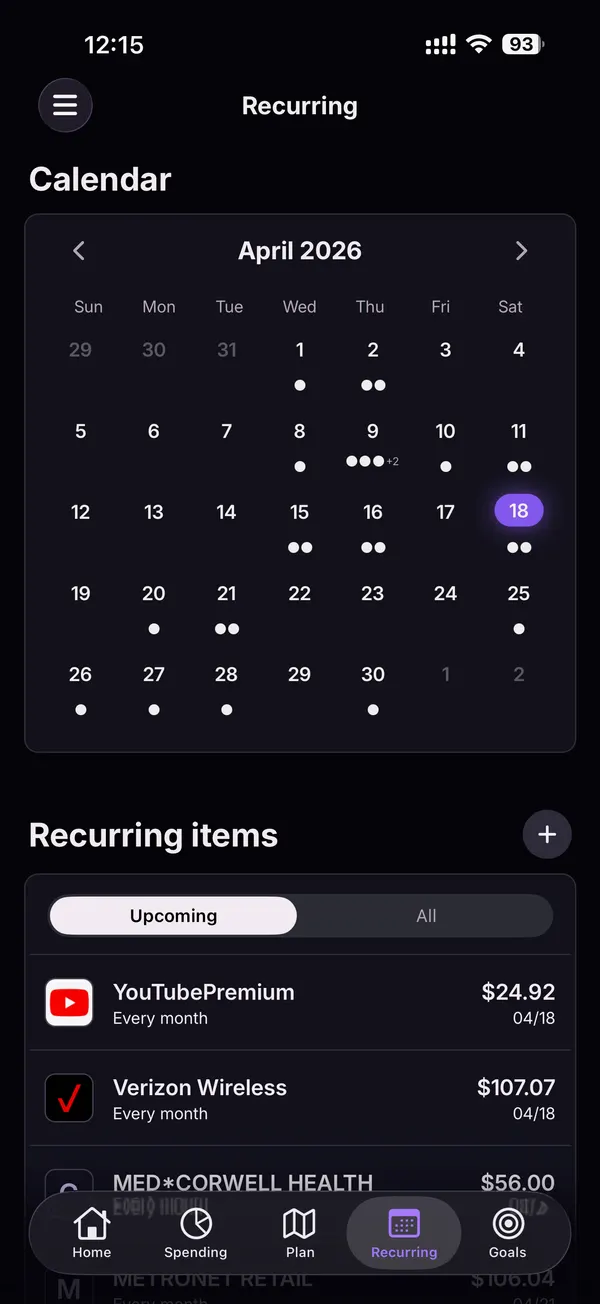
MoneyMap finds your recurring charges and subscriptions automatically and puts them on a calendar, so nothing sneaks up on you.
Save up, pay down debt, or cut spending, with progress tied right into your budget.
Every screen is built for speed and clarity, with no dashboards you'll never open.

Link checking, savings, credit cards, loans, and investments, then open the app to one clear view: what you've spent this month, your net worth, and how it's trending.

If you're paid biweekly, a calendar-month budget never quite lines up: some months have three paychecks, and rent sometimes lands before payday. MoneyMap plans each paycheck instead (monthly works too), then compares income against spending so you see exactly where the rest went.

Every recurring charge mapped onto a calendar (streaming, phone, utilities, medical) with exact dates and amounts.

Tap any transaction for the full picture: merchant, amount, location, account, status, category, and your notes.
Only you can see your money. Not even we can.
Everything lives on your phone and catches up when you're back online.
Shared budgets and goals, one subscription per household.
Your finances stay behind Face ID or Touch ID every time you close the app.
MoneyMap is available for iPhone. Download it on the App Store, start your 7-day risk-free trial, and connect your first account in minutes.
No. Only you can see your accounts and transactions. Not even we can. Your financial data is encrypted on your device and stays private by default.
Thousands of US banks and credit unions. Connecting is secure, and your bank login is never stored by MoneyMap.
Yes. Everything lives on your phone, so MoneyMap works offline: on a plane, in a tunnel, anywhere. It catches up automatically when you reconnect.
Instead of budgeting a calendar month, MoneyMap starts a budget period each time you get paid, whether that's weekly, biweekly, or semi-monthly. Bills and goals are planned against the paycheck that pays for them, which matches how most people actually live. Apps like Monarch, Copilot, and Rocket Money budget by calendar month; MoneyMap can do that too if you prefer it.
MoneyMap covers the essentials those apps are known for, like linked accounts, budgets, and subscription tracking, with two big differences: it's private by default (end-to-end encrypted, so not even we can see your money) and it lets you budget by paycheck, not just by calendar month. See our full comparison of Mint alternatives for an honest look at how the options stack up.
Yes. Invite a partner with a quick scan, share budgets and goals together, and only one subscription is needed per household.
Email support@moneymap.cc. Since we can't see your financial data, support is limited to app-level issues.
Want the technical details? Read about our security & privacy.
Start your 7-day risk-free trial, link your accounts, and see your whole financial picture in minutes.